Got a new Pi Pico and it looks very promising. Want to use Oled display with it.
Friday, June 17, 2022

Sunday, August 23, 2020
Two Nano version finished on breadboard
The breadboard version pretty much finished. Want to document where I got to.
Here's the screen that shows the bottom nano running an 1802 program and disassembling it in real time.

The program on the left is just a default dummy program loaded in when system starts up. The 1802 "thinks" ROM starts at $0 in dumb IC but's just fetching from lower nano.
The breadboard setup is pictured bellow.

LHS is CDP1802, Top nano does address bus work. Bottom nano outputs instructions to 1802 and links with PC via terminal.
The program in the lower Nano is spi0SlaveN.ino and is in pastebin https://pastebin.com/tYEcYJPX
The program in the upper nano is spiMaster8.ino, https://pastebin.com/zZv02c6v
The little embedded 1802 program that comes with the lower nano is nano2E.lst https://pastebin.com/qwVtupjv
The final thing to do is to insert a longer program via terminal that goes into nano's memory at $4000. This can be done via avrdude as outlined in previous post.
Friday, July 3, 2020
Two nano version of CDP1802 board started
The breadboard version of the CDP1802 2 Nano system is starting.
 And the schematic for the breadboard is below. But only some of the breadboard is complete. Just wanted to get to stage where hardware derived nops force addresses to increment. The address is picked up by the top nano via blue wires from MA0 to MA7 and timed by yellow TPA,TPB wires.
This address is sent via SPI on white wires to the lower bottom nano,Nb, and sent to serial terminal screen.
 The clock only goes at about 1.5 Hz from D3 of Nb. The LEDs are attached to MA0 and MA1 to indicate the 1802 address is cycling. The 1802 data bus, BUS0..BUS7 is hard wired to Vcc and GND rails via 10K resistors corresponding with code $C4, ie nop. So all the 1802 does is continuous nops but increments its address every three cycles of 7 clocks at about 600ms for each clock cycle.
The code for the two nanos. Slave is: https://pastebin.com/EC7UL3T8
and the master is: https://pastebin.com/AT99nVvK. Neither are finsihed but the addresses are being transferred slowly and reliably from cycling nop 1802 to top nano Nt, to bottom nano Nb.

This address is sent via SPI on white wires to the lower bottom nano,Nb, and sent to serial terminal screen.

The code for the two nanos. Slave is: https://pastebin.com/EC7UL3T8
and the master is: https://pastebin.com/AT99nVvK. Neither are finsihed but the addresses are being transferred slowly and reliably from cycling nop 1802 to top nano Nt, to bottom nano Nb.
Tuesday, June 9, 2020
Arduino Mega 2560 board + 1802 PCB design completed
JUst completed Mega 2650 board shield with 1802 on it. Used EasyEDA and sent design to JLPCB.
Here's Schematic:
 and here's the planned finished product.
 and here's the PCB top side:
 and here's the underside:


Here's Schematic:


and all from this breadboard "design"

The most recent arduino file that worked OK,I think, is:
C:\Users\Dell\Documents\Arduino\PB_Sketches_May20\CDP1802f03\CDP1802f03.ino
Which is in pastebin here: https://pastebin.com/xHTkrFR3
While waiting for PCB's to arrive, will plan two Nano version of Cosmacuino.
Wednesday, May 20, 2020
Disassmbler now in flash PROGMEM
Running out of nano memory in RAM, only 2K bytes so rewrote 1802 disassembler so that all the disassembly information is in flash ROM.
Here's the side-program that disassembles 1802 hex codes;
https://pastebin.com/nVu7iVYz
New lines used look like this:
const char flashHiNib3[] PROGMEM = {"[00idl.][01ldn.L[10inc.L[20dec.L[30br.N[31bq.N[32bz.N[33bdf.N[34b1.N[35b2.N[36b3.N[37b4.N[38skp.][39bnq.N[3Abnz.N[3Bbnf.N[3Cbn1.N[3Dbn2.N[3Ebn3.N[3Fbn4.N[40lda.L[50str.L [60irx.L[61out.L[69inp.L[70ret.]abcd[71dis.][72ldxa.][73stxd][74adc.][75sdb.][76shrc.][77smb.][78sav.][79mark.][7Aseq.][7Breq.][7Caddi.N[7Dsdbi.N[7Eshlc.][7Fsmbi.N[80glo.L[90ghi.L[A0plo.L[B0phi.L[C0lbr.T[C1lbq.T[C2lbz.T[C3lbdf.T[C4nop.][C5lsnq.][C6lsnz.][C7lsnf.][C8lskp.][C9lbnq.T[CAlbnz.T[CBlbnf.T[CClsie.][CDlsq.][CElsz.][CFlsdf.][D0sep.L[E0sex.L[F0ldx.][F1or.][F2and.][F3xor.][F4add.][F5sd.][F6shr.][F7sm.][F8ldi.N[F9ori.N[FAani.N[FBxri.N[FCadi.N[FDsdi.N[FEshl.][FFsmi.N"}; //};
and..
Serial.println(F("All ready? "));
Got whole disassembler plus a few helper routines and sample data down to about 209 bytes.
Here's the side-program that disassembles 1802 hex codes;
https://pastebin.com/nVu7iVYz
New lines used look like this:
const char flashHiNib3[] PROGMEM = {"[00idl.][01ldn.L[10inc.L[20dec.L[30br.N[31bq.N[32bz.N[33bdf.N[34b1.N[35b2.N[36b3.N[37b4.N[38skp.][39bnq.N[3Abnz.N[3Bbnf.N[3Cbn1.N[3Dbn2.N[3Ebn3.N[3Fbn4.N[40lda.L[50str.L [60irx.L[61out.L[69inp.L[70ret.]abcd[71dis.][72ldxa.][73stxd][74adc.][75sdb.][76shrc.][77smb.][78sav.][79mark.][7Aseq.][7Breq.][7Caddi.N[7Dsdbi.N[7Eshlc.][7Fsmbi.N[80glo.L[90ghi.L[A0plo.L[B0phi.L[C0lbr.T[C1lbq.T[C2lbz.T[C3lbdf.T[C4nop.][C5lsnq.][C6lsnz.][C7lsnf.][C8lskp.][C9lbnq.T[CAlbnz.T[CBlbnf.T[CClsie.][CDlsq.][CElsz.][CFlsdf.][D0sep.L[E0sex.L[F0ldx.][F1or.][F2and.][F3xor.][F4add.][F5sd.][F6shr.][F7sm.][F8ldi.N[F9ori.N[FAani.N[FBxri.N[FCadi.N[FDsdi.N[FEshl.][FFsmi.N"}; //};
and..
Serial.println(F("All ready? "));
Got whole disassembler plus a few helper routines and sample data down to about 209 bytes.
Friday, May 8, 2020
Cosmacuino works with embedded 1802 code in high flash
Managed to get a short 1802 program going that starts off in mega's RAM and carries on above avr program in flash. PLan is to have RAM as just a place to leap up to$4000 and above on the 32K m328p, as well as a stack and short buffer place.
This program:
C:\Users\Dell\Documents\Arduino\PB_SketchApril12\CDP1802e93\CDP1802e93.ino
acts as ROM and RAM for 1802. Delivers instructions. Problem is there's not enough ram on Arduino nano, 2k, where this program is eventually going to live so I've just used a ram buffer called vRAM[] to start things off then hand over to program above $4000. Currently, on the mega which has 8K of static ram, a buffer of 1024 called vRAM[1024] holds temporary 1802 code.
This is the report from avrdude:
Sketch uses 13118 bytes (5%) of program storage space. Maximum is 253952 bytes.
Global variables use 3077 bytes (37%) of dynamic memory, leaving 5115 bytes for local variables. Maximum is 8192 bytes.
C:\Program Files\WindowsApps\ArduinoLLC.ArduinoIDE_1.8.33.0_x86__mdqgnx93n4wtt\hardware\tools\avr/bin/avrdude -CC:\Program Files\WindowsApps\ArduinoLLC.ArduinoIDE_1.8.33.0_x86__mdqgnx93n4wtt\hardware\tools\avr/etc/avrdude.conf -v -patmega2560 -cwiring -PCOM15 -b115200 -D -Uflash:w:C:\ardtemp/CDP1802e93.ino.hex:i
The .ino file above is actually extended up to $4000 where main 1802 code is burned in. In the gap between the last byte of the arduino code viz. $333E=13118, and $4000, filler bytes are inserted. Currently zeros.
The file that cuts up the 1802 bin
....not sure where this post was going so will leave it as is then publish it ..
This program:
C:\Users\Dell\Documents\Arduino\PB_SketchApril12\CDP1802e93\CDP1802e93.ino
acts as ROM and RAM for 1802. Delivers instructions. Problem is there's not enough ram on Arduino nano, 2k, where this program is eventually going to live so I've just used a ram buffer called vRAM[] to start things off then hand over to program above $4000. Currently, on the mega which has 8K of static ram, a buffer of 1024 called vRAM[1024] holds temporary 1802 code.
This is the report from avrdude:
Sketch uses 13118 bytes (5%) of program storage space. Maximum is 253952 bytes.
Global variables use 3077 bytes (37%) of dynamic memory, leaving 5115 bytes for local variables. Maximum is 8192 bytes.
C:\Program Files\WindowsApps\ArduinoLLC.ArduinoIDE_1.8.33.0_x86__mdqgnx93n4wtt\hardware\tools\avr/bin/avrdude -CC:\Program Files\WindowsApps\ArduinoLLC.ArduinoIDE_1.8.33.0_x86__mdqgnx93n4wtt\hardware\tools\avr/etc/avrdude.conf -v -patmega2560 -cwiring -PCOM15 -b115200 -D -Uflash:w:C:\ardtemp/CDP1802e93.ino.hex:i
The .ino file above is actually extended up to $4000 where main 1802 code is burned in. In the gap between the last byte of the arduino code viz. $333E=13118, and $4000, filler bytes are inserted. Currently zeros.
The file that cuts up the 1802 bin
....not sure where this post was going so will leave it as is then publish it ..
Combined file seems to work on Mega
Wanted system where big arduino program that talks to CDP1802 can be surrounded by 1802 code that can be fed, slowly, into real 1802. Had problems feeding arduino program eg CDP1802e93.hex that talks to 1802 and the 1802 asm program eg tackOn0.hex both into avrdude burning. Tried various ways as it seemed to work ok, at least for blink.hex type programs on arduino nano.
Finally wrote a c program that takes two hex files and combines them into one combined hex file and then that gets burned into arduino mega. Seems to work.
C program https://pastebin.com/w6y0RjyC C:\TinyC\MyFiles9May20\combine6.c
Mega program: https://pastebin.com/mxUWzfzD C:\Users\Dell\Documents\Arduino\PB_SketchApril12\CDP1802e93\CDP1802e93.ino
1802 program: https://pastebin.com/JewvwYKZ C:\TinyC\MyFiles9May20\tackOn0.asm
The avrdude line that burned in the combinedFilo.hex was:
Dell@DESKTOP-FGA8Q4U C:\TinyC\MyFiles9May20
$ \tinyc\avrdude -C \tinyc\avrdude.conf -v -patmega2560 -cwiring -PCOM14 -b115200 -D -Uflash:w:combinedFile0.bin:r
C program invoked like this:
Dell@DESKTOP-FGA8Q4U C:\TinyC\MyFiles9May20
$ combine6.exe CDP1802e93.ino.bin tackOn0.bin
Note it was the bin files that get combined.
Hex files were changed to bin like this:
Dell@DESKTOP-FGA8Q4U C:\TinyC\MyFiles9May20
$ ..\hex2bin.exe CDP1802e93.ino.hex
Picture of some of the above:

Added this few days later. Look at this Bray++ logfile:
Terminal log file
Date: 12/05/2020 - 11:20:51 AM
-----------------------------------------------
[[[Adr1 000d : nop ]
[[[Adr1 000e : lbr 400]
[[[Adr1 4000 : ldi 01]
[[Adr1 4002 : phi 7]
[[Adr1 4003 : lbr 0c]
[[[Adr1 000c : nop ]
[[[Adr1 000d : nop ]
[[[Adr1 000e : lbr 400]
[[[Adr1 4000 : ldi 01]
[[Adr1 4002 : phi 7]
[[Adr1 4003 : lbr 0c]
[[[Adr1 000c : nop ]
[[[Adr1 000d : nop ]
[[[Adr1 000e : lbr 400]
[[[Adr1 4000 : ldi 01]
[[Adr1 4002 : phi 7]
[[Adr1 4003 : lbr 0c]
[[[Adr1 000c : nop ]
[[[Adr1 000d : nop ]
[[[Adr1 000e : lbr 400]
-----------------------------------------------
Date: 12/05/2020 - 11:21:19 AM
End log file
There is a jump from low memory, around, $000e, to high memory $4000 then back again.
This is the tackon file that's split into two parts. One part goes into vRAM[] and the high part is birned up in $4000 by invoking avrdude the combined file with the normal arduino part CDP1802e93.hex with tackOn0.hex.
When the mega starts up it runs a default little loop of 1802.asm commands that start off in vRAM[] declaration. To get it to use above code you press M2 in terminal that asks for a block of 1802 bytes. Chose low1802.bin that gets sliced off bottom of tackOn0.bin automatically by combine6.exe. Once this low little program gets installed it does a reset and then joins up with rest of tackOn but jumping up to $4000 and back down again. We do this to jump over arduino code.
Finally wrote a c program that takes two hex files and combines them into one combined hex file and then that gets burned into arduino mega. Seems to work.
C program https://pastebin.com/w6y0RjyC C:\TinyC\MyFiles9May20\combine6.c
Mega program: https://pastebin.com/mxUWzfzD C:\Users\Dell\Documents\Arduino\PB_SketchApril12\CDP1802e93\CDP1802e93.ino
1802 program: https://pastebin.com/JewvwYKZ C:\TinyC\MyFiles9May20\tackOn0.asm
The avrdude line that burned in the combinedFilo.hex was:
Dell@DESKTOP-FGA8Q4U C:\TinyC\MyFiles9May20
$ \tinyc\avrdude -C \tinyc\avrdude.conf -v -patmega2560 -cwiring -PCOM14 -b115200 -D -Uflash:w:combinedFile0.bin:r
C program invoked like this:
Dell@DESKTOP-FGA8Q4U C:\TinyC\MyFiles9May20
$ combine6.exe CDP1802e93.ino.bin tackOn0.bin
Note it was the bin files that get combined.
Hex files were changed to bin like this:
Dell@DESKTOP-FGA8Q4U C:\TinyC\MyFiles9May20
$ ..\hex2bin.exe CDP1802e93.ino.hex
Picture of some of the above:

Added this few days later. Look at this Bray++ logfile:
Terminal log file
Date: 12/05/2020 - 11:20:51 AM
-----------------------------------------------
[[[Adr1 000d : nop ]
[[[Adr1 000e : lbr 400]
[[[Adr1 4000 : ldi 01]
[[Adr1 4002 : phi 7]
[[Adr1 4003 : lbr 0c]
[[[Adr1 000c : nop ]
[[[Adr1 000d : nop ]
[[[Adr1 000e : lbr 400]
[[[Adr1 4000 : ldi 01]
[[Adr1 4002 : phi 7]
[[Adr1 4003 : lbr 0c]
[[[Adr1 000c : nop ]
[[[Adr1 000d : nop ]
[[[Adr1 000e : lbr 400]
[[[Adr1 4000 : ldi 01]
[[Adr1 4002 : phi 7]
[[Adr1 4003 : lbr 0c]
[[[Adr1 000c : nop ]
[[[Adr1 000d : nop ]
[[[Adr1 000e : lbr 400]
-----------------------------------------------
Date: 12/05/2020 - 11:21:19 AM
End log file
There is a jump from low memory, around, $000e, to high memory $4000 then back again.
This is the tackon file that's split into two parts. One part goes into vRAM[] and the high part is birned up in $4000 by invoking avrdude the combined file with the normal arduino part CDP1802e93.hex with tackOn0.hex.
When the mega starts up it runs a default little loop of 1802.asm commands that start off in vRAM[] declaration. To get it to use above code you press M2 in terminal that asks for a block of 1802 bytes. Chose low1802.bin that gets sliced off bottom of tackOn0.bin automatically by combine6.exe. Once this low little program gets installed it does a reset and then joins up with rest of tackOn but jumping up to $4000 and back down again. We do this to jump over arduino code.
Thursday, May 7, 2020
Maybe have to go back to merging files.
Going to try:
c:\tinyc\avrdude -CC:\tinyc\avrdude.conf -v -patmega328p -carduino -PCOM15 -b57600 -Uflash:w:high2.hex:i -Uflash:r:dump6.bin:r
This seems to work. But it doesn't on mega. Not sure why.Changed high2.asm around and it still works. around $5000. NB old stuff around $4000 still there too.
Better go back to merged files. Am creating quite a good c file that takes two files and merges them.
c:\tinyc\avrdude -CC:\tinyc\avrdude.conf -v -patmega328p -carduino -PCOM15 -b57600 -Uflash:w:high2.hex:i -Uflash:r:dump6.bin:r
This seems to work. But it doesn't on mega. Not sure why.Changed high2.asm around and it still works. around $5000. NB old stuff around $4000 still there too.
Better go back to merged files. Am creating quite a good c file that takes two files and merges them.
C:\TinyC\MyFiles5May20_0\combine5.c
//https://stackoverflow.com/questions/16479006/can-i-use-fgetc-or-fputc-in-a-binary-file
//Tue May 5 11:39:35 NZST 2020. Now want to chop 1802 bin file into lower and upper parts. 0-$400 and $4000-endoffile
//Wed May 6 15:55:34 NZST 2020. Looking at command linelist of files.
#include<stdio.h>
#include <string.h>
#include <stdlib.h>
void ttest1(void);
int fileIsReal(char* );
int exists(const char *fname);
int k;
char str1[32] ;
int main( int argc, char *argv[])
{ k=argc;
strcpy(str1, argv[1]); //copies argv[1] into str1. May be useful.
printf("Argc is %d.\n",argc);
if( argc == 3 ) {
printf("The first argument supplied is file %s. ", argv[1]);
printf(" Its length is %d, ",strlen(argv[1]));
char c1 = argv[1][strlen(argv[1])-1];
printf("and the last character is '%c'. \n" , c1) ; //argv[1][strlen(argv[1])-1]);
//if(c1!='x') system ("Notepad.exe");
printf("The second argument supplied is file %s. ", argv[2]);
printf(" Its length is %d, ",strlen(argv[2]));
char c2 = argv[2][strlen(argv[2])-1];
printf("and the last character is '%c'. \n" , c2) ; //argv[1][strlen(argv[1])-1]);
}
else if( argc > 3 ) {
printf("Too many arguments supplied.\n");
exit(4);
}
else {
printf("Two arguments expected.\n");
exit(5);
}
/*printf("Argc is %d, ",argc);
printf("argv[1] is %s, ",argv[1]);
printf("argv[2] is %s.\n ",argv[2]); */
//FILE * fptr = fopen("BlinkNew3.ino.bin", "rb"); // open existingblink file for nano
//FILE * fptr = fopen("CDP1802e91.ino.bin", "rb"); // open existingblink file for nano
//FILE * fptr = fopen("CDP1802e93.ino.bin", "rb"); // open existingblink file for nano
//printf("Result of exists() function for %s is %d\n",argv[1],exists(argv[1]));
if(exists(argv[1] )) printf("File %s can be used. ",argv[1]);
else {
printf(" Can't find file %s.",argv[1]);
exit(3);
}
if(exists(argv[2] )) printf(" File %s can be used.\n",argv[2]);
else {
printf(" Can't find file %s.",argv[2]);
exit(3);
}
FILE * fptr = fopen(argv[1], "rb"); // open existingblink file for nano
FILE * fptr1 = fopen( argv[2], "rb"); // open long file with 1802 code above $4000 and $0 to 1K
//char buffer[10000] = {0}; // the pic is 6kb or so, so 10k bytes will hold it
FILE * fptr2 = fopen("combinedFile0.bin", "wb"); // open a new binary file to be sent to mega
FILE * fptr3 = fopen("low1802.bin", "wb"); // open a new binary file for vRAM[] insertion via terminal
unsigned long fileLen, fileLen1;
unsigned long counter;
fseek(fptr, 0, SEEK_END);
fileLen=ftell(fptr); // get the exact size of the blink file
fseek(fptr, 0, SEEK_SET);
printf("The size of argv[1], %s, is %d bytes. ",argv[1],fileLen);
fseek(fptr1, 0, SEEK_END);
fileLen1=ftell(fptr1); // get the exact size of the blink file
fseek(fptr1, 0, SEEK_SET);
printf("The size of argv[2], %s, is %d bytes.\n ",argv[2],fileLen1);
for(counter=0; counter<fileLen; counter++)
fputc(fgetc(fptr),fptr2); // read each byte of the arduino file. Put into combinedFile0
for(counter=fileLen; counter<0x4000; counter++) //fill in the gap between arduino file and 1802asm.bin
fputc(0x00,fptr2);
fseek(fptr1,0x4000,SEEK_SET);
for(counter=0x4000; counter<fileLen1; counter++)
fputc(fgetc(fptr1),fptr2); //Put bytes from 1802.asm file that are above $4000 into combinedFile0
fseek(fptr1,0,SEEK_SET);
for(counter=0; counter<0x400; counter++)
fputc(fgetc(fptr1),fptr3); //Put bytes from 1802.asm file that are below $400 into low1802.bin .
fclose(fptr);
fclose(fptr1);
fclose(fptr2);
fclose(fptr3);
return 0;
}
void ttest1(void) {
printf("The fttttirst argument supplied is %d", k);
}
/*int fileIsReal(char* filename) {
int j;
FILE * fptr = fopen(argv[1], "rb");
}*/
int exists(const char *fname)
{
FILE *file;
if ((file = fopen(fname, "r")))
{
fclose(file);
return 1;
}
return 0;
}
Or use sreccat :
srec_cat.exe HexFile1.hex -Intel HexFile2.hex -Intel -o MergedHexFile.hex -Intel
Just flash 1802.hex file above arduino file.
Thought it was good that both arduinoFile.hex and 1802asm.hex could be flashed together. But it's easier than that. Just flash 1802asm.hex file into existing arduino nano flash containing normal blink.hex or other. Like this:
c:\tinyc\avrdude -CC:\tinyc\avrdude.conf -v -patmega328p -carduino -PCOM15 -b57600 -Uflash:w:hi.hex:i -Uflash:r:dump0.bin:r
The file dump0.bin not really needed but it was good to check whole 32K read back.
Still not tried on mega with big 13k cdp1802e93.hex program. Next task.
Didn't work on mega. This did on nano.:
Going to try:
c:\tinyc\avrdude -CC:\tinyc\avrdude.conf -v -patmega328p -carduino -PCOM15 -b57600 -Uflash:w:high2.hex:i -Uflash:r:dump6.bin:r
This seems to work. But it doesn't on mega. Not sure why.Changed high2.asm around and it still works. around $5000. NB old stuff around $4000 still there too.
c:\tinyc\avrdude -CC:\tinyc\avrdude.conf -v -patmega328p -carduino -PCOM15 -b57600 -Uflash:w:hi.hex:i -Uflash:r:dump0.bin:r
The file dump0.bin not really needed but it was good to check whole 32K read back.
Still not tried on mega with big 13k cdp1802e93.hex program. Next task.
Didn't work on mega. This did on nano.:
Going to try:
c:\tinyc\avrdude -CC:\tinyc\avrdude.conf -v -patmega328p -carduino -PCOM15 -b57600 -Uflash:w:high2.hex:i -Uflash:r:dump6.bin:r
This seems to work. But it doesn't on mega. Not sure why.Changed high2.asm around and it still works. around $5000. NB old stuff around $4000 still there too.
Wednesday, May 6, 2020
flashed hi and low using avrdude and two hex files.
Wrote normal blink program for nano and also assembled a 1802 program called hi.asm into hi.hex.
Used avrdude to burn both into nano and read back contents with this command:
$ c:\tinyc\avrdude -CC:\tinyc\avrdude.conf -v -patmega328p -carduino -PCOM15 -b57600 -Uflash:w:Blink1.ino.hex:i -Uflash:w:hi.hex:i -Uflash:r:dump.bin:r
Looked at big dump file, dump.bin and both the avr code and the little 1802 program were there.
Means we don't have to combine files in software. Just assemble 1802.asm into 1802.hex then combine and burn with one avrdude command.

c:\tinyc\avrdude -CC:\tinyc\avrdude.conf -v -patmega328p -carduino -PCOM15 -b57600 -Uflash:w:Blink1.ino.hex:i -Uflash:w:hi.hex:i -Uflash:r:dump.bin:r
Note two files flashed (one normal blink.hex-type file and one assembled 1802.hex file), one big file read back.
Used avrdude to burn both into nano and read back contents with this command:
$ c:\tinyc\avrdude -CC:\tinyc\avrdude.conf -v -patmega328p -carduino -PCOM15 -b57600 -Uflash:w:Blink1.ino.hex:i -Uflash:w:hi.hex:i -Uflash:r:dump.bin:r
Looked at big dump file, dump.bin and both the avr code and the little 1802 program were there.
Means we don't have to combine files in software. Just assemble 1802.asm into 1802.hex then combine and burn with one avrdude command.

c:\tinyc\avrdude -CC:\tinyc\avrdude.conf -v -patmega328p -carduino -PCOM15 -b57600 -Uflash:w:Blink1.ino.hex:i -Uflash:w:hi.hex:i -Uflash:r:dump.bin:r
Note two files flashed (one normal blink.hex-type file and one assembled 1802.hex file), one big file read back.
Wednesday, April 29, 2020
avrdude
Want to use avrdude from Arduino files but those files are locked inside Windowsapps folder in Program Files folder of C: drive.
C:\Program Files\WindowsApps\ArduinoLLC.ArduinoIDE_1.8.33.0_x86__mdqgnx93n4wtt\hardware\tools\avr/bin/avrdude -CC:\Program Files\WindowsApps\ArduinoLLC.ArduinoIDE_1.8.33.0_x86__mdqgnx93n4wtt\hardware\tools\avr/etc/avrdude.conf -v -patmega328p -carduino -PCOM14 -b57600 -D -Uflash:w:C:\ardtemp/Blink1.ino.hex:i
How's that for a file name (above). This invokes avrdude that programs a little nano.
The version is:
avrdude: Version 6.3-20190619
Had to unlock Windowsapps folder using instructions found here:
https://answers.microsoft.com/en-us/windows/forum/all/what-is-windows-apps-hidden-folder-and-why-cant-i/40a60508-c409-422a-af92-bd51fe5a4ca9
Might put a copy of avrdude and associated conf file into ardtemp where the file.ino.hex file live. The can do avrdude invokes away from official Arduino folder for safety.
Did this and had no luck til I inserted baud rate. So while in c:\ardtemp dirI wrote on command line:
Dell@DESKTOP-FGA8Q4U C:\ardtemp
$ avrdude -Cavrdude.conf -v -patmega328p -carduino -PCOM14 -b57600 -Uflash:w:Blink1.ino.hex:i
...and it worked.
Now want to read entire file back.
Mega uses following for avrdude in normal mode:
C:\Program Files\WindowsApps\ArduinoLLC.ArduinoIDE_1.8.33.0_x86__mdqgnx93n4wtt\hardware\tools\avr/bin/avrdude -CC:\Program Files\WindowsApps\ArduinoLLC.ArduinoIDE_1.8.33.0_x86__mdqgnx93n4wtt\hardware\tools\avr/etc/avrdude.conf -v -patmega2560 -cwiring -PCOM15 -b115200 -D -Uflash:w:C:\ardtemp/CDP1802e91.ino.hex:i
-------------------------------------------------------further research-----------------
Mega uses following for avrdude in normal mode:
C:\Program Files\WindowsApps\ArduinoLLC.ArduinoIDE_1.8.33.0_x86__mdqgnx93n4wtt\hardware\tools\avr/bin/avrdude -CC:\Program Files\WindowsApps\ArduinoLLC.ArduinoIDE_1.8.33.0_x86__mdqgnx93n4wtt\hardware\tools\avr/etc/avrdude.conf -v -patmega2560 -cwiring -PCOM15 -b115200 -D -Uflash:w:C:\ardtemp/CDP1802e91.ino.hex:i
revised is:
avrdude -C avrdude.conf -v -patmega2560 -cwiring -PCOM15 -b115200 -D -Uflash:w:CDP1802e91.ino.bin:r
Try this above.
But avrdude, latest copy (avrdude version 6.3-20190619,) now resides in c:\TinyC, as does conf file.So, to revise above, try:
(while in folder containing the arduino bin file below)
$ \tinyc\avrdude -C \tinyc\avrdude.conf -v -patmega2560 -cwiring -PCOM15 -b115200 -D -Uflash:w:CDP1802e91.ino.bin:r
\tinyc\avrdude -C \tinyc\avrdude.conf -v -patmega2560 -cwiring -PCOM15 -b115200 -D -Uflash:w:CDP1802e91.ino.bin:r (<--worked)12:14 PM 5/05/2020
C:\Program Files\WindowsApps\ArduinoLLC.ArduinoIDE_1.8.33.0_x86__mdqgnx93n4wtt\hardware\tools\avr/bin/avrdude -CC:\Program Files\WindowsApps\ArduinoLLC.ArduinoIDE_1.8.33.0_x86__mdqgnx93n4wtt\hardware\tools\avr/etc/avrdude.conf -v -patmega328p -carduino -PCOM14 -b57600 -D -Uflash:w:C:\ardtemp/Blink1.ino.hex:i
How's that for a file name (above). This invokes avrdude that programs a little nano.
The version is:
avrdude: Version 6.3-20190619
Had to unlock Windowsapps folder using instructions found here:
https://answers.microsoft.com/en-us/windows/forum/all/what-is-windows-apps-hidden-folder-and-why-cant-i/40a60508-c409-422a-af92-bd51fe5a4ca9
Might put a copy of avrdude and associated conf file into ardtemp where the file.ino.hex file live. The can do avrdude invokes away from official Arduino folder for safety.
Did this and had no luck til I inserted baud rate. So while in c:\ardtemp dirI wrote on command line:
Dell@DESKTOP-FGA8Q4U C:\ardtemp
$ avrdude -Cavrdude.conf -v -patmega328p -carduino -PCOM14 -b57600 -Uflash:w:Blink1.ino.hex:i
...and it worked.
Now want to read entire file back.
Mega uses following for avrdude in normal mode:
C:\Program Files\WindowsApps\ArduinoLLC.ArduinoIDE_1.8.33.0_x86__mdqgnx93n4wtt\hardware\tools\avr/bin/avrdude -CC:\Program Files\WindowsApps\ArduinoLLC.ArduinoIDE_1.8.33.0_x86__mdqgnx93n4wtt\hardware\tools\avr/etc/avrdude.conf -v -patmega2560 -cwiring -PCOM15 -b115200 -D -Uflash:w:C:\ardtemp/CDP1802e91.ino.hex:i
-------------------------------------------------------further research-----------------
Mega uses following for avrdude in normal mode:
C:\Program Files\WindowsApps\ArduinoLLC.ArduinoIDE_1.8.33.0_x86__mdqgnx93n4wtt\hardware\tools\avr/bin/avrdude -CC:\Program Files\WindowsApps\ArduinoLLC.ArduinoIDE_1.8.33.0_x86__mdqgnx93n4wtt\hardware\tools\avr/etc/avrdude.conf -v -patmega2560 -cwiring -PCOM15 -b115200 -D -Uflash:w:C:\ardtemp/CDP1802e91.ino.hex:i
revised is:
avrdude -C avrdude.conf -v -patmega2560 -cwiring -PCOM15 -b115200 -D -Uflash:w:CDP1802e91.ino.bin:r
Try this above.
But avrdude, latest copy (avrdude version 6.3-20190619,) now resides in c:\TinyC, as does conf file.So, to revise above, try:
(while in folder containing the arduino bin file below)
$ \tinyc\avrdude -C \tinyc\avrdude.conf -v -patmega2560 -cwiring -PCOM15 -b115200 -D -Uflash:w:CDP1802e91.ino.bin:r
\tinyc\avrdude -C \tinyc\avrdude.conf -v -patmega2560 -cwiring -PCOM15 -b115200 -D -Uflash:w:CDP1802e91.ino.bin:r (<--worked)12:14 PM 5/05/2020
Tuesday, April 28, 2020
ISR works on real 1802
Terminal log file
Date: 28/04/2020 - 8:14:58 PM
-----------------------------------------------
[[Adr1 0003 : phi 2]
[[Adr1 0004 : ldi 45]
[[Adr1 0006 : plo 2]
[[Adr1 0007 : sex 2]
[[Adr1 0008 : ldi 00]
[[Adr1 000a : phi 1]
[[Adr1 000b : ldi 55]
[[Adr1 000d : plo 1]
[[Adr1 000e : ldi 2d]
[[Adr1 0010 : stxd ]
[[Adr1 0011 : inc 2]
[[Adr1 0012 : out 1]
## 2D
[[Adr1 0013 : br 12] ;just looping at this stage until...
[[Adr1 0012 : out 1]
## 22
[[Adr1 0013 : br 12]
[[Adr1 0012 : out 1]
## 33
[[Adr1 0013 : br 12]
[[Adr1 0012 : out 1]
## F
[[Adr1 0013 : br 12]
[[Adr1 0012 : out 1]
## 55
[[Adr1 0013 : br 12]
[[Adr1 0012 : out 1]
## 0
[Command received is : int ;terminal command causes int pin to go low
[Adr1 0013 : br 12] ;finishes that instruction
[[[Adr1 0055 : dec 2] ;then jumps to ISR at 0x0055
[[Adr1 0056 : sav ]
[[Adr1 0057 : dec 2]
[[Adr1 0058 : str 2]
[[Adr1 0059 : nop ]
[[[Adr1 005a : br 53]
[[Adr1 0053 : lda 2]
[[Adr1 0054 : dis ] ;ISR ends here. dis turns off interrupts.
[[Adr1 0012 : out 1]
## 0
[[Adr1 0013 : br 12]
[[Adr1 0012 : out 1]
## 0
[[Adr1 0013 : br 12]
[[Adr1 0012 : out 1]
## 0
[[Adr1 0013 : br 12]
[[Adr1 0012 : out 1]
## 0
[[Adr1 0013 : br 12]
[[Adr1 0012 : out 1]
## 0
[[Adr1 0013 : br 12]
[[Adr1 0012 : out 1]
## 0
[[Adr1 0013 : br 12]
[[Adr1 0012 : out 1]
## 0
-----------------------------------------------
Date: 28/04/2020 - 8:15:42 PM
End log file
Date: 28/04/2020 - 8:14:58 PM
-----------------------------------------------
[[Adr1 0003 : phi 2]
[[Adr1 0004 : ldi 45]
[[Adr1 0006 : plo 2]
[[Adr1 0007 : sex 2]
[[Adr1 0008 : ldi 00]
[[Adr1 000a : phi 1]
[[Adr1 000b : ldi 55]
[[Adr1 000d : plo 1]
[[Adr1 000e : ldi 2d]
[[Adr1 0010 : stxd ]
[[Adr1 0011 : inc 2]
[[Adr1 0012 : out 1]
## 2D
[[Adr1 0013 : br 12] ;just looping at this stage until...
[[Adr1 0012 : out 1]
## 22
[[Adr1 0013 : br 12]
[[Adr1 0012 : out 1]
## 33
[[Adr1 0013 : br 12]
[[Adr1 0012 : out 1]
## F
[[Adr1 0013 : br 12]
[[Adr1 0012 : out 1]
## 55
[[Adr1 0013 : br 12]
[[Adr1 0012 : out 1]
## 0
[Command received is : int ;terminal command causes int pin to go low
[Adr1 0013 : br 12] ;finishes that instruction
[[[Adr1 0055 : dec 2] ;then jumps to ISR at 0x0055
[[Adr1 0056 : sav ]
[[Adr1 0057 : dec 2]
[[Adr1 0058 : str 2]
[[Adr1 0059 : nop ]
[[[Adr1 005a : br 53]
[[Adr1 0053 : lda 2]
[[Adr1 0054 : dis ] ;ISR ends here. dis turns off interrupts.
[[Adr1 0012 : out 1]
## 0
[[Adr1 0013 : br 12]
[[Adr1 0012 : out 1]
## 0
[[Adr1 0013 : br 12]
[[Adr1 0012 : out 1]
## 0
[[Adr1 0013 : br 12]
[[Adr1 0012 : out 1]
## 0
[[Adr1 0013 : br 12]
[[Adr1 0012 : out 1]
## 0
[[Adr1 0013 : br 12]
[[Adr1 0012 : out 1]
## 0
[[Adr1 0013 : br 12]
[[Adr1 0012 : out 1]
## 0
-----------------------------------------------
Date: 28/04/2020 - 8:15:42 PM
End log file
ISR working in simulation.
This worked in simulation. Might try in real 1802 with slowish stepping.
C:\Users\Dell\Documents\1802_Data\a18\WorkingApril282020\intsPractice1.lst
0000 START ORG 0
0000 7b seq
0001 f8 03 ldi $03 ;careful, we have some nops up there.
0003 b2 phi 2 ;R2 is stack pointer
0004 f8 45 ldi $45
0006 a2 plo 2 ;R2=stack pointer now points to $00ff
0007 e2 sex 2 ;X now pnts to R2, the stack pointer. 00ff
0008 f8 00 ldi HIGH(ISR)
000a b1 phi 1
000b f8 55 ldi LOW(ISR)
000d a1 plo 1
000e loop0
000e f8 2d ldi $2d ;want output this byte on channel 1
0010 73 stxd
0011 12 inc 2
;here P=0 and X=2
; enableinterrupts
; sex 0 ;P=0 currently
; ret ;
; DB $20 ;ret will use this. Now P=0,X=2. Interrupts enabled
; disableinterrupts
; sex 0 ;P=0 currently
; dis ;
; DB $20 ;dis will use this.Now P=0,X=2 and interrupts disabled
0012 loop1
0012 61 out 1
0013 30 12 br loop1
0053 ORG $0053
0053 exit ;leave ISR here
0053 42 lda 2 ;put back DB
0054 71 dis ;same as ret but disable interrupts
;ret ;X,P get old values. Enable interrupts
0055 ORG $0055
0055 ISR ;get R1 to point here for interrupts. T = XP
0055 22 dec 2 ;R=2 is stack ptr. Point to free space
0056 78 sav ;T goes to MR(X)
0057 22 dec 2 ;fresh slot on stack
0058 52 str 2 ;D goes on stack
0059 c4 nop ;do other stuff
005a 30 53 br exit ;leave main part of ISR
0345 ORG $345
0345 11 22 33 0f DB $11,$22,$33,$0f,$55
0349 55
03fb ORG $3fb
03fb c4 nop
03fc c4 nop
03fd c4 nop
03fe c4 nop
03ff c4 nop
0400 END
0055 ISR 0000 START 0053 exit 000e loop0
0012 loop1
C:\Users\Dell\Documents\1802_Data\a18\WorkingApril282020\intsPractice1.lst
0000 START ORG 0
0000 7b seq
0001 f8 03 ldi $03 ;careful, we have some nops up there.
0003 b2 phi 2 ;R2 is stack pointer
0004 f8 45 ldi $45
0006 a2 plo 2 ;R2=stack pointer now points to $00ff
0007 e2 sex 2 ;X now pnts to R2, the stack pointer. 00ff
0008 f8 00 ldi HIGH(ISR)
000a b1 phi 1
000b f8 55 ldi LOW(ISR)
000d a1 plo 1
000e loop0
000e f8 2d ldi $2d ;want output this byte on channel 1
0010 73 stxd
0011 12 inc 2
;here P=0 and X=2
; enableinterrupts
; sex 0 ;P=0 currently
; ret ;
; DB $20 ;ret will use this. Now P=0,X=2. Interrupts enabled
; disableinterrupts
; sex 0 ;P=0 currently
; dis ;
; DB $20 ;dis will use this.Now P=0,X=2 and interrupts disabled
0012 loop1
0012 61 out 1
0013 30 12 br loop1
0053 ORG $0053
0053 exit ;leave ISR here
0053 42 lda 2 ;put back DB
0054 71 dis ;same as ret but disable interrupts
;ret ;X,P get old values. Enable interrupts
0055 ORG $0055
0055 ISR ;get R1 to point here for interrupts. T = XP
0055 22 dec 2 ;R=2 is stack ptr. Point to free space
0056 78 sav ;T goes to MR(X)
0057 22 dec 2 ;fresh slot on stack
0058 52 str 2 ;D goes on stack
0059 c4 nop ;do other stuff
005a 30 53 br exit ;leave main part of ISR
0345 ORG $345
0345 11 22 33 0f DB $11,$22,$33,$0f,$55
0349 55
03fb ORG $3fb
03fb c4 nop
03fc c4 nop
03fd c4 nop
03fe c4 nop
03ff c4 nop
0400 END
0055 ISR 0000 START 0053 exit 000e loop0
0012 loop1
Now writing to virtual RAM
Actually, date wrong. Got out of sequence.

0000 START ORG 0
0000 7b seq
0001 7a req
0002 7b seq
0003 f8 00 ldi $00
0005 b7 phi 7
0006 f8 98 ldi 98H
0008 a7 plo 7
0009 f8 a5 write ldi $A5 ;MADE CHANGE to $5b in above
000b 57 str 7
000c 30 09 br write
0064 ORG 100
0064 c4 nop
0065 END
0000 START 0009 write
COSMACuino 0.1 going.
Now have ability to send programs to Mega which the 1802 "thinks" is ROM. Status information continuously sent to Bray term. Two "commands"used du=dump contents of virtual RAM to serial terminal, gf=get file, a .bin file from the a18 assembler. When a new file is received, the 1802 stops and resets and starts using new 1802 instructions just received.
See below:

See below:

Enable and disable interrupts on 1802.
Relies on a trick where X is set to P so that after a RET x is pointing to the byte beyond the RET and this is the pretend T that is usually on the stack at the end of a internet service routine.
0000 START ORG 0
0000 7b seq
0001 f8 03 ldi $03 ;careful, we have some nops up there.
0003 b2 phi 2 ;R2 is stack pointer
0004 f8 45 ldi $45
0006 a2 plo 2 ;R2=stack pointer now points to $00ff
0007 e2 sex 2 ;X now pnts to R2, the stack pointer. 00ff
0008 loop0
0008 f8 2d ldi $2d ;want output this byte on channel 1
000a 73 stxd
000b 12 inc 2
;here P=0 and X=2
000c enableinterrupts
000c e0 sex 0 ;P=0 currently. Now X is too.
000d 70 ret ;goes and gets T from stack, but stackptr is now R0
000e 20 DB $20 ;ret will use this. Now P=0,X=2. Interrupts enabled
000f disableinterrupts
000f e0 sex 0 ;P=0 currently.Now X is too.
0010 71 dis ;
0011 20 DB $20 ;dis will use this.Now P=0,X=2 and interrupts disabled
0012 loop1
0012 61 out 1
0013 30 12 br loop1
0345 ORG $345
0345 11 22 33 0f DB $11,$22,$33,$0f,$55
0349 55
03fb ORG $3fb
03fb c4 nop
03fc c4 nop
03fd c4 nop
03fe c4 nop
03ff c4 nop
0400 END
0000 START 000f disableinterrupts 000c enableinterrupts 0008 loop0
0012 loop1
0000 START ORG 0
0000 7b seq
0001 f8 03 ldi $03 ;careful, we have some nops up there.
0003 b2 phi 2 ;R2 is stack pointer
0004 f8 45 ldi $45
0006 a2 plo 2 ;R2=stack pointer now points to $00ff
0007 e2 sex 2 ;X now pnts to R2, the stack pointer. 00ff
0008 loop0
0008 f8 2d ldi $2d ;want output this byte on channel 1
000a 73 stxd
000b 12 inc 2
;here P=0 and X=2
000c enableinterrupts
000c e0 sex 0 ;P=0 currently. Now X is too.
000d 70 ret ;goes and gets T from stack, but stackptr is now R0
000e 20 DB $20 ;ret will use this. Now P=0,X=2. Interrupts enabled
000f disableinterrupts
000f e0 sex 0 ;P=0 currently.Now X is too.
0010 71 dis ;
0011 20 DB $20 ;dis will use this.Now P=0,X=2 and interrupts disabled
0012 loop1
0012 61 out 1
0013 30 12 br loop1
0345 ORG $345
0345 11 22 33 0f DB $11,$22,$33,$0f,$55
0349 55
03fb ORG $3fb
03fb c4 nop
03fc c4 nop
03fd c4 nop
03fe c4 nop
03ff c4 nop
0400 END
0000 START 000f disableinterrupts 000c enableinterrupts 0008 loop0
0012 loop1
Monday, April 27, 2020
OUT instruction proves tricky but perhaps OK now.

For OUT 1 (0x61) the byte cycle after instruction fetch puts the address in R(x) on address bus, does a read, ie. pulls MRD* low. This causes the memory byte M(R(X)) to go onto the data bus. Here it can be read by an I/O device like 8255 PORT. This is possible because the 1802 also decodes the LSNibble of the 0x6X instruction and puts X (1,2,..7) on the bus.The nBus. In this case above, we enter the )x61= OUT 1 instruction with X=2 and R2 = 0345. The byte at 0345 is 0x0f. So during the cycle after reading OUT 1=0x61 instruction, R(X) = 0345 is put on address bus, MRD* is brought low, N=1 put on nBus and the byte 0x0f is read onto the data bus. Also, R(X) is incremented so is pointing to the next byte in increasing-address string.
Note that to put 0x0f on stack with ldi 0x0f, stxd, we have to increment stack pointer R2 so R2 points to the 0x0f (0345) not (0344). We have to undo the decrementing of R2 during stxd.
All this took me a while to get right on real 1802 as the issues were compounded be having stack starting at 03ff and increasing into variable RAM territory above there as well as power supply batteries for 1802 getting around 3.5 volts and causing intermittent errors. Each issue confused solving surrounding issues.
Saturday, April 25, 2020
Cosmacuino has disassembler
Cosmacuino has disassembler but getting too big for nano.WIP
 Note in serial terminal screen getting 20KHz clock cycle. Fastest yet but still slowed down by all that Arduino loop code. Get a big jump going from delay =02,01 then zero.Maybe compiler just misses out delay(0) and doesn't even visit delay() code.
Arduino code is in pasetbin: https://pastebin.com/a8HFscTC
Terminal shortcuts are here: https://pastebin.com/FhA4MMX0

Arduino code is in pasetbin: https://pastebin.com/a8HFscTC
Terminal shortcuts are here: https://pastebin.com/FhA4MMX0
Friday, April 17, 2020
Cosmacuino 0.2, but no disassembler yet.
 cadsPasted latest version C:\Users\Dell\Documents\Arduino\PB_SketchApril12\CDP1802e1\CDP1802e1.ino to Pastebin, in background. Also you can see serial terminal work in Bray terminal as well as list of terminal commands that can be sent to Arduino. There is an interpretb funcition that acts of command like singlestep etc. Viz:
--------------------------------------------------------------------------------------
void interpretCommand() {
String Command(receivedChars); //**important
if(Command.equals("gf")){
Serial.print("Getting File");
getFile();
serialFlush();
Serial.println("**done gf flush** Now resetting");
doReset();
}
if(Command.equals("dk")){
dumpVariableVert(1024);
serialFlush();
Serial.println("**done dkflush**");
}
if(Command.equals("du")){
dumpVariableVert(256);
serialFlush();
Serial.println("**done duflush**");
}
if(Command.equals("re")){
doReset();
TPBCtr=0; clkCtr = 0;
serialFlush();
Serial.println("**did reset flush**");
}
if((receivedBytes[0]==0x62)&&(receivedBytes[1]==0x70)) doBreakPoint2(); //<bpxxxx>
if((receivedBytes[0]==0x6f)&&(receivedBytes[1]==0x70)) doOpStop2();
......etc.......
---------------------------------------------------------------------------------------------
Sunday, March 22, 2020
Prepare Arduino Serial for 1802 bin files
Want to sent bin files to Mega where they will be put into vRAM[] to be used when running 1802 in slow mode, just as if they were in ROM, the bytes.
Practiced using Uno with little program that waits for BrayTerm++ to send a bin file that was the output of an a18.exe assembly process.
Looks a bit like this below.
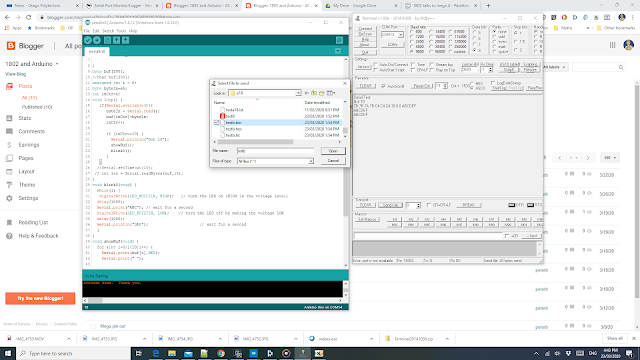
Bray Terminal Program keeps being best of its kind and may be used in this project instead of Arduino's terminal.
Practiced using Uno with little program that waits for BrayTerm++ to send a bin file that was the output of an a18.exe assembly process.
Looks a bit like this below.

Bray Terminal Program keeps being best of its kind and may be used in this project instead of Arduino's terminal.
Subscribe to:
Posts (Atom)
-
 1802 talks to Arduino Mega. If a constant $c4 = nop is output from PORTC of mega to BUS of 1802 it always fetches a nop, just as it did i...
 -
This worked in simulation. Might try in real 1802 with slowish stepping. C:\Users\Dell\Documents\1802_Data\a18\WorkingApril282020\intsPrac...
-
 Cosmacuino has disassembler but getting too big for nano.WIP Note in serial terminal screen getting 20KHz clock cycle. Fastest yet but s...